Norges Bandyforbund er et paraplyforbund for de tre idrettene: Innebandy – Bandy – Hockey (landhockey).
Forbundet har totalt fem grener: Innebandy – Bandy – Hockey – El-innebandy – Rinkbandy.
De tre idrettene er tilknyttet tre forskjellige internasjonale særforbund; The International Floorball Federation (innebandy), The Federation of International Bandy (bandy og rinkbandy) og The International Hockey Federation (hockey). Norges Bandyforbund er i så måte et unikt særforbund under Norges Idrettsforbund. (El-innebandy er ikke tilknyttet noe internasjonalt forbund.)
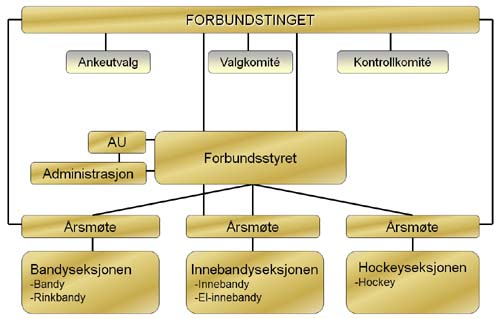
For å ivareta de forskjellige grenenes interesser i forbundet, har man tre seksjoner som har det faglige ansvaret for disse. Innebandyseksjonen har ansvar for innebandy og el-innebandy. Bandyseksjonen har ansvar for bandy og rinkbandy. Hockeyseksjonen har ansvar for hockey.
Hvert annet år avholder seksjonene sine årsmøter hvor representanter fra klubbene og kretsene velger et seksjonsstyre.
Hvert annet år blir det holdt et forbundsting hvor kretsene og representanter fra alle de tre seksjonene møter. På dette tinget blir det valgt et forbundsstyre som består av en president, en visepresident, fem styremedlemmer og to varamedlemmer for disse. Normalt velges lederne for hver av seksjonene som tre av styremedlemmene. I perioden mellom forbundstingene er det forbundsstyret som er Norges Bandyforbunds høyeste besluttende organ.
Våre samarbeidspartnere: